
Make Microsoft Agent Framework’s Structured Output Work With Qwen and DeepSeek Models
Updated to the latest version of Microsoft Agent Framework


Update: After version python-1.0.0b260114, MAF made big changes to the response_format related APIs, but the official docs haven’t been updated yet. This article is based on version python-1.0.0b260127 and brings you the latest structured output solution.
Introduction
Today, we’ll add some extra features to the Microsoft Agent Framework so that Qwen and DeepSeek can also utilize structured output.
The main reason is that Autogen has stayed on version v0.75 for a long time, which makes it necessary to switch to Microsoft Agent Framework soon.
Every time we switch the agent framework, we have to make it work with some common LLMs. This time is no exception. Luckily, Microsoft Agent Framework is pretty easy to use. We just need to adapt the structured output feature, and we can use it right away.
As usual, I’ll put the source code at the end of the article for you to use.
Background On Structured Output
How does Agent Framework do structured output?
In Microsoft Agent Framework, we set the response_format parameter to a Pydantic BaseModel data class to tell the LLM to produce structured output, like this:
from pydantic import BaseModel

class PersonInfo(BaseModel):
    """Information about a person."""
    name: str | None = None
    age: int | None = None
    occupation: str | None = None

response = await agent.run(
    "Please provide information about John Smith, who is a 35-year-old software engineer.",
    options={
        "response_format": PersonInfo
    },
)
There are two places to set the response_format parameter:
- Set it during the
ChatAgentinitialization indefault_optionsparameter. This becomes a global parameter for the agent, and all later communications with OpenAI-compatible models use it. - Set it when calling
runorrun_streaminoptionsparameter. This works only for that single API call.
The response_format set in run or run_stream is higher priority than the setting in the ChatAgent creation. That means the response_format in run will override what was set when creating the ChatAgent.
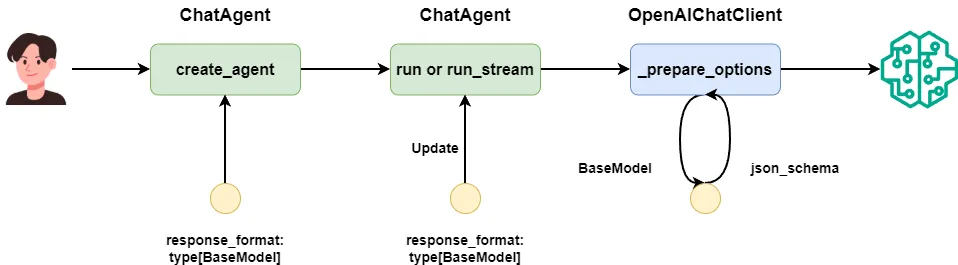
By default, we use OpenAIChatClient to call OpenAI’s API. Before the API call, a _prepare_options method converts the BaseModel into {"type": "json_schema", "json_schema": <base model schema>} and passes it to the LLM.
So that’s how Agent Framework makes the LLM do structured output. Our extension will go into the _prepare_options method of OpenAIChatClient.
Do Qwen and DeepSeek support json_schema settings?
According to the official docs, both Qwen and DeepSeek support structured output. But they only support setting the OpenAI client’s response_format to {"type": "json_object"} and require the keyword json in the prompt to enable structured output. They do not support OpenAI’s API way of setting response_format to json_schema.
If we don’t extend the Microsoft Agent Framework and force response_format to be a BaseModel class, we’ll see errors like this:
Error code: 400 - {'error': {'message': "<400> InternalError.Algo.InvalidParameter: 'messages' must contain the word 'json' in some form, to use 'response_format' of type 'json_object'.", 'type': 'invalid_request_error', 'param': None, 'code': 'invalid_parameter_error'}}So for Qwen and DeepSeek, without modifying the Microsoft Agent Framework, we can’t use the structured output feature.
How to make Qwen and DeepSeek output using json_schema
Even though Qwen and DeepSeek don’t support {"type": "json_schema"}, we can still inject json_schema into the system prompt so the LLM outputs according to our data class.
The trick is: before calling the OpenAI API, convert the BaseModel to its json_schema, attach it to the system prompt, and send it along.
If you want to know exactly how I made Qwen output according to a Pydantic BaseModel’s rules, read my popular article where I explain multiple methods for this:
 Peng Qian
How I Extended It
Now, let’s see exactly how to extend Microsoft Agent Framework so Qwen and DeepSeek can do structured output.
I know you want the answer fast, so here’s the modified code you can use right now:
from typing import override, MutableSequence, Any
from textwrap import dedent
from copy import deepcopy

from pydantic import BaseModel
from agent_framework.openai import OpenAIChatClient
from agent_framework import ChatMessage, ChatOptions, TextContent

class OpenAILikeChatClient(OpenAIChatClient):
    @override
    def _prepare_options(self, messages: MutableSequence[ChatMessage], options: dict[str, Any]) -> dict[str, Any]:
        chat_options_copy = deepcopy(options)
        response_format = chat_options_copy.get("response_format")

        if (
            response_format
            and isinstance(response_format, type)
            and issubclass(response_format, BaseModel)
        ):
            structured_output_prompt = self._build_structured_prompt(response_format)
            if old_instructions := chat_options_copy.get("instructions"):
                chat_options_copy["instructions"] = f"{old_instructions}\n\n{structured_output_prompt}"
            else:
                messages = [ChatMessage(role=Role.SYSTEM, text=structured_output_prompt), *messages]

            chat_options_copy["response_format"] = {"type": "json_object"}

        return super()._prepare_options(messages, chat_options_copy)

    @staticmethod
    def _build_structured_prompt(response_format: type[BaseModel]) -> str:
        json_schema = response_format.model_json_schema()
        structured_output_prompt = dedent(f"""
        <output-format>\n
        Your output must adhere to the following JSON schema format,
        without any Markdown syntax, and without any preface or explanation:\n
        {json_schema}\n
        </output-format>
        """)

        return structured_output_prompt
As I said before, both run and run_stream call OpenAIChatClient’s _prepare_options method, so it’s the best place to extend.
I marked each part of the code with numbers in the comments so I can explain in order:
- The
chat_optionsobject is the parameters you pass to the method. We need todeepcopyit to a new object because we’re going to changeresponse_formatto{"type": "json_object"}to work with DeepSeek. Agent Framework still needs the originalBaseModelto convert the returned JSON string back to a data class. - Then we take the
json_schemafrom theBaseModel, turn it into part of the system prompt, and wrap it withxmltags. - The original
_prepare_optionschecks ifmessagesis empty. We’ll only handle the case wheremessagesis not empty, meaning the user sends at least a user message. - If the first message in
messagesis a system message, we attach the structured output prompt to the system message, replacing the old system message. - If the first message is a user message, we create a new system message with just the structured output prompt and put it at the front of the
messageslist.
With this change, Microsoft Agent Framework now supports structured output for Qwen and DeepSeek. Next, let’s test some common cases to make sure it works.
Testing the Extension
Prepare an MLflow server to observe
Before testing, we need a monitoring tool to check the messages Agent Framework sends to the LLM API.
Agent Framework supports logging platforms based on opentelemetry, but it doesn’t log system messages by default, so that won’t work for our case today.
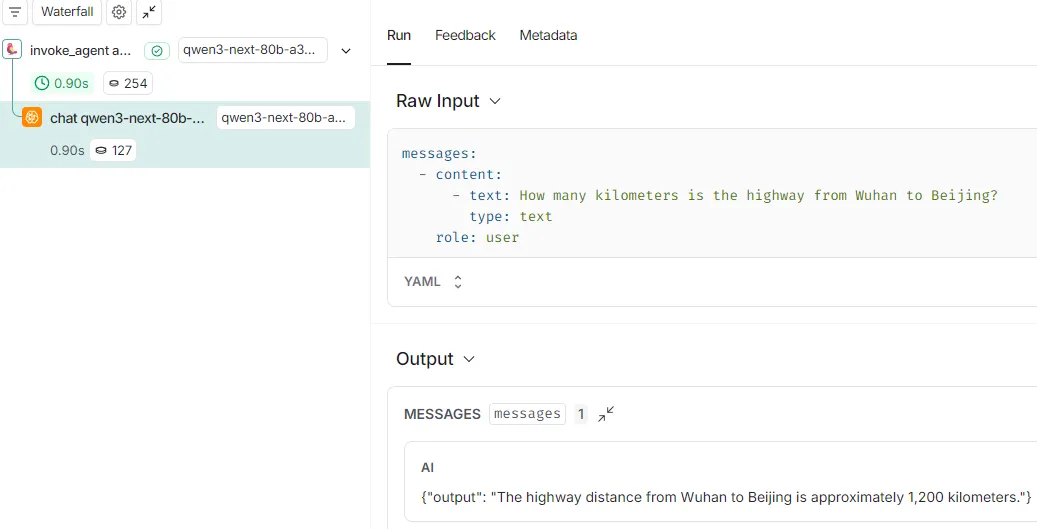
In a previous article, I showed how I use MLflow to see the messages sent to OpenAI’s API:
 Peng Qian
So today we’ll still use MLflow’s openai.autolog API, because it can record system messages sent to the LLM.
You just need to start a server like this:
mlflow server --host 0.0.0.0 --port 5000Then in the test code, add a call to openai.autolog:
mlflow.set_tracking_uri(os.environ.get("MLFLOW_TRACKING_URI"))
mlflow.set_experiment("Default")
mlflow.openai.autolog()
Test single-turn conversation
First, let’s follow the official docs to test normal structured output.
💡 Unlock Full Access for Free!
Subscribe now to read this article and get instant access to all exclusive member content + join our data science community discussions.