
How to Use Agent Skills in Enterprise LLM Agent Systems
A thorough and detailed hands-on guide


Introduction
Enterprise-grade agentic systems have fallen way behind the desktop agent apps that everyone's been buzzing about lately.
After spending the better part of a year building enterprise agent applications, I came to one conclusion: if your agent system can't plug into your company's existing business processes, it won't bring real value to your organization.
Desktop systems like OpenClaw and Claude Cowork solved this problem. They don't change their agent setup at all. Instead, they use Agent Skills to capture human business processes, then share those skills between desktop agent systems through the file system. That's how they tackle one business problem after another.
But enterprise users write their skills through a web interface and save them to a database. There's a good chance the process involves complex approval and security audit steps, too. So how does your agent load these skills in real time without any downtime?
The latest version of Microsoft Agent Framework finally makes this possible with its Agent Skills feature.
TL;DR
With Agent Skills in Microsoft Agent Framework, enterprise agent systems can load user-defined business process skills from a database in real time, and run the scripts and generated code that come with those skills safely inside containers.
Your agent system stays secure and stable, while gaining the same flexible business process orchestration that desktop agents enjoy.
All the source code in this tutorial is available at the end of the article.
Before We Start
Install the latest Microsoft Agent Framework
To use Agent Skills, install the latest version of Microsoft Agent Framework:
pip install agent-framework --preOr, like me, you can pin the version of agent-framework in your pyproject.toml:
dependencies = [
    "agent-framework>=1.0.0rc4",
    "agent-framework-ag-ui>=1.0.0b260311",
]
Then tell uv to allow prerelease versions:
uv sync --prerelease=allowInstall Tavily Agent Skills
My end goal is to show you how to share and load Agent Skills between agents deployed across distributed nodes. But I think we should start simple. First, let me show you how to load and use skills from the community.
Let's start with Tavily Agent Skills. We'll only load the tavily-best-practices skill. It guides my agent on how to generate Tavily-based search code based on the task at hand, instead of calling a hardcoded function:
npx skills add tavily-ai/skillsDon't worry. After the initial demo, I'll walk you through how to load skills from a database in real time.
How to Load Agent Skills from Disk
Let's start with the most basic approach.
In Microsoft Agent Framework, context operations are handled by a base class called ContextProvider. The latest version of MAF ships a SkillsProvider class. Use it directly and pass the location of your skills through the skill_paths attribute, and you're done. skill_paths doesn't require a default directory like .claude/skills, and you can pass in multiple paths.
skills_provider = SkillsProvider(
    skill_paths=get_current_directory() / ".agents/skills",
)
Next, create your agent and pass the skills_provider instance through context_providers.
skills_agent = chat_client.as_agent(
    name="SkillsAssistant",
    instructions="You're a helpful assistant, and you'll respond to user requests according to your skills.",
    context_providers=[skills_provider],
    tools=[code_tool],
)
To run the Python code the agent writes based on the Tavily skill instructions, you need to pass a code_interpreter tool to the agent. Let the code run inside a container environment. I'll cover that in detail later.
Write a main method to test the agent:
async def main():
    async with code_executor:
        session = agent.create_session()
        result = await skills_agent.run(
            "Check how gold ETFs performed in February 2026 and give some investment advice.",
            session=session
        )

        print(result)
Microsoft Agent Framework provides an OpenTelemetry-based telemetry tool. I hooked it up to MLflow. Let's run the agent once and see what happens:
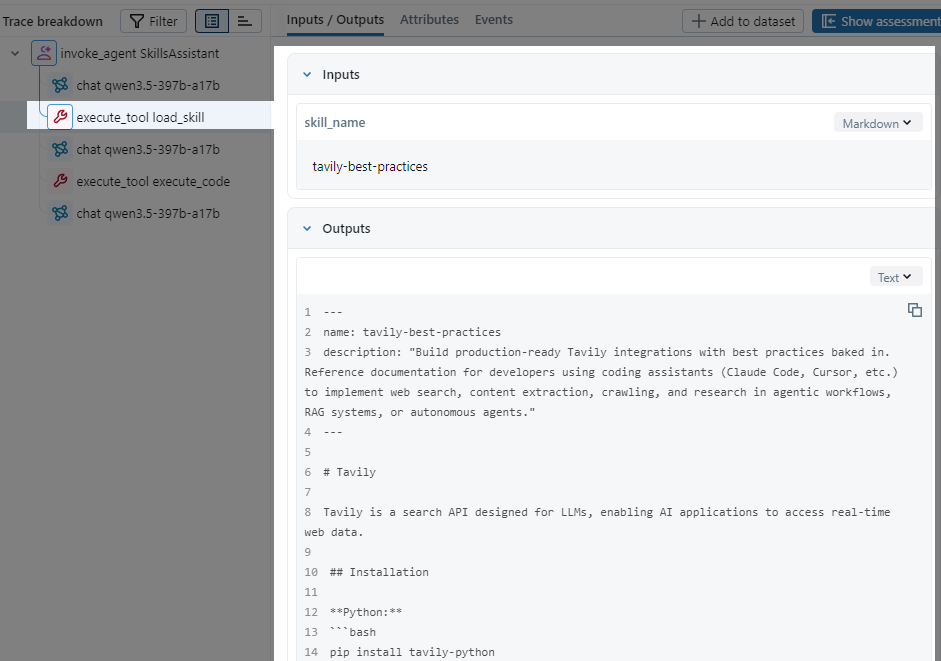
You can see that once the agent decided it needed Tavily to search, it loaded the full SKILL.md document, wrote Tavily search code following the instructions, then sent it to the code interpreter for execution. Exactly what we expected.
You can learn how to use MLFlow in this article:
 Peng Qian
How Agent Skills Work
Now let's talk about how to get the most out of Agent Skills in enterprise systems. That means loading external skills in real time, containerizing the code interpreter, and managing context more carefully.
But before we go there, let's dig into how Agent Skills actually work inside MAF, so the rest of this tutorial makes more sense.
As I mentioned, SkillsProvider extends BaseContextProvider, which means it works by operating on the agent's context.
When you initialize SkillsProvider, you pass one or more search paths to the skill_paths attribute. Take the .agents/skills directory as an example. On startup, SkillsProvider recursively searches this directory and finds every subdirectory that contains a SKILL.md file. Then it extracts the name and description fields from each SKILL.md file, along with the file content, and stores everything in a Skill object.
SkillsProvider loops through these Skill objects, formats the name and description fields like this, and merges them into the agent's system prompt. This keeps the agent aware of available skills without loading their full content upfront.
lines.append("  <skill>")
lines.append(f"    <name>{xml_escape(skill.name)}</name>")
lines.append(f"    <description>{xml_escape(skill.description)}</description>")
lines.append("  </skill>")
SkillsProvider also adds two methods to the agent through context: load_skill and read_skill_resource. When the agent decides which skill it needs based on the user's request, it calls load_skill to look up the matching Skill object by name and loads its full content into the context.
If a skill's content references extra resource files like references/search.md, the agent can call read_skill_resource to load those files.
Here's the full workflow:
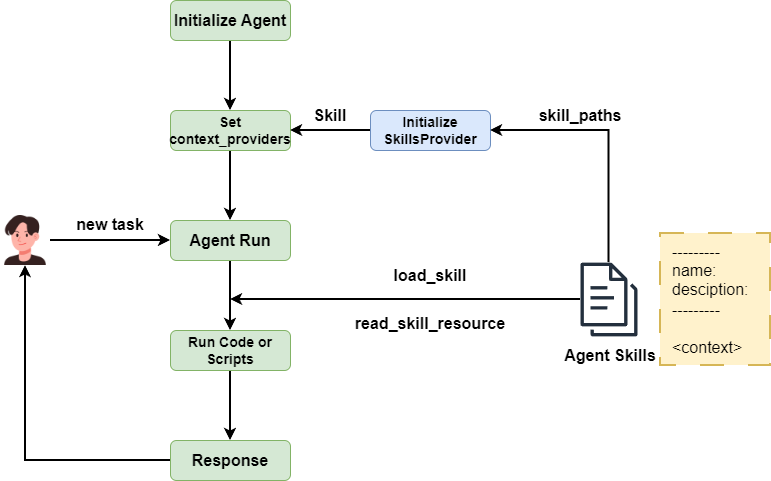
This design follows the progressive disclosure principle defined by agentskills.io. Skill content loads into the agent's context gradually, only when needed. No context explosion, no wasted tokens.
Agent Skills for Enterprise Systems
Alright, enough theory. Let's get into today's main topic: how to use Agent Skills in enterprise-grade agentic systems.
Load skills from external systems in real time
What if business users write their skills through a cloud-based web page and save them to a database? How do you handle that?
We need a new approach to sync and apply Agent Skills in real time.
As I covered earlier, when SkillsProvider initializes, it loads all SKILL.md files from the input paths into an in-memory list of Skill objects.
Besides the file system approach, SkillsProvider also supports Code Defined Skills, where you write skill content directly in code:
from pathlib import Path
from agent_framework import Skill, SkillsProvider

my_skill = Skill(
    name="my-code-skill",
    description="A code-defined skill",
    content="Instructions for the skill.",
)
Then pass it to SkillsProvider through the skills attribute:
skills_provider = SkillsProvider(
    skill_paths=Path(__file__).parent / "skills",
    skills=[my_skill],
)
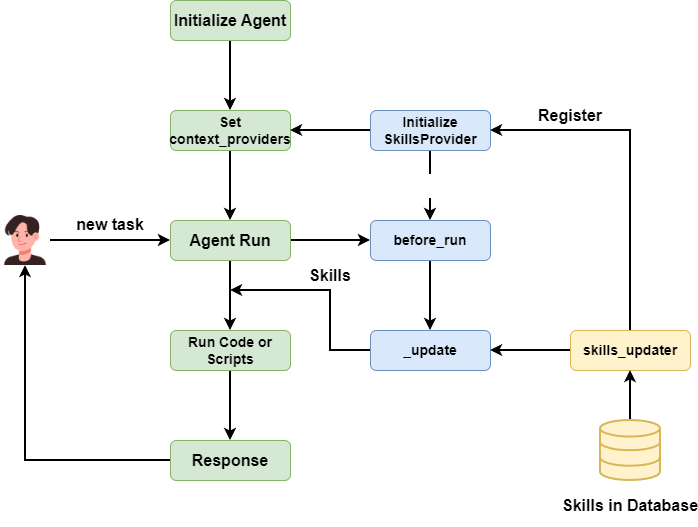
This opens the door to managing and loading skills from a database. But the original SkillsProvider class only accepts skills at initialization time. We want to load skills dynamically while the agent system is running, so we need to extend SkillsProvider.
After reading the source code, I found that every class extending BaseContextProvider has a before_run method that gets called when the agent calls run. We can load the latest skills from the database before before_run executes, then update SkillsProvider's self._skills list and refresh the skills description in instructions.
What I need is a hook method. Every time before before_run runs, this hook fetches the latest skills. All I need to do is put the database fetching logic inside this hook.
💡 Unlock Full Access for Free!
Subscribe now to read this article and get instant access to all exclusive member content + join our data science community discussions.