Diving into LlamaIndex AgentWorkflow: A Nearly Perfect Multi-Agent Orchestration Solution
And fix the issue where the agent can't continue with past requests

This article introduces you to the latest AgentWorkflow multi-agent orchestration framework by LlamaIndex, demonstrating its application through a project, highlighting its drawbacks, and explaining how I solved them.
By reading this, you'll learn how to simplify multi-agent orchestration and boost development efficiency using LlamaIndex AgentWorkflow.
The project source code discussed here is available at the end of the article for your review and modification without my permission.
Introduction
Recently, I had to review LlamaIndex's official documentation for work and was surprised by the drastic changes: LlamaIndex has rebranded itself from a RAG framework to a multi-agent framework integrating data and workflow. The entire documentation is now built around AgentWorkflow.
Multi-agent orchestration is not new.
For enterprise-level applications, we don’t use a standalone agent to perform a series of tasks. Instead, we prefer a framework that can orchestrate multiple agents to collaborate on completing complex business scenarios.
When it comes to multi-agent orchestration frameworks, you've probably heard of LangGraph, CrewAI, and AutoGen. However, LlamaIndex, once a framework as popular as LangChain, seemed silent in the multi-agent space in the past six months.
Considering LlamaIndex’s high maturity and community involvement, the release of LlamaIndex AgentWorkflow caught our attention. So, my team and I studied it for a month and found that for practical applications, AgentWorkflow is a nearly perfect multi-agent orchestration solution.
Smart as you might be, you might ask, since LlamaIndex Workflow has been out for half a year, what's the difference between Workflow and AgentWorkflow? To answer this, we must first look at how to use LlamaIndex Workflow for multi-agent setups.
What Is Workflow?
I previously wrote an article detailing what LlamaIndex Workflow is and how to use it:
 Peng Qian
In simple terms, Workflow is an event-driven framework using Python asyncio for concurrent API calls to large language models and various tools.
I also wrote about implementing multi-agent orchestration similar to OpenAI Swarm's agent handoff using Workflow:
 Peng Qian
However, Workflow is a relatively low-level framework and quite disconnected from other LlamaIndex modules, necessitating frequent learning and calls to LlamaIndex's underlying API when implementing complex multi-agent logic.
If you’ve read my article, you'll notice I heavily rely on LlamaIndex’s low-level API across Workflow’s step methods for function calls and process control, leading to tight coupling between the workflow and agent-specific code. This isn’t ideal for those of us who want to finish work early and enjoy dinner at home.
Perhaps LlamaIndex heard developers’ appeals, leading to the birth of AgentWorkflow.
How Does AgentWorkflow Work?
AgentWorkflow consists of an AgentWorkflow module and an Agent module. Unlike existing LlamaIndex modules, both are specially tailored for recent multi-agent objectives. Here, let’s first discuss the Agent module:
Agent module
The Agent module primarily consists of two classes: FunctionAgent and ReActAgent, both inheriting from BaseWorkflowAgent, hence incompatible with previous Agent classes.
Use FunctionAgent if your language model supports function calls; if not, use ReActAgent. In this article, we use function calls to complete specific tasks, so we’ll focus on FunctionAgent:
FunctionAgent mainly has three methods: take_step, handle_tool_call_results, and finalize.
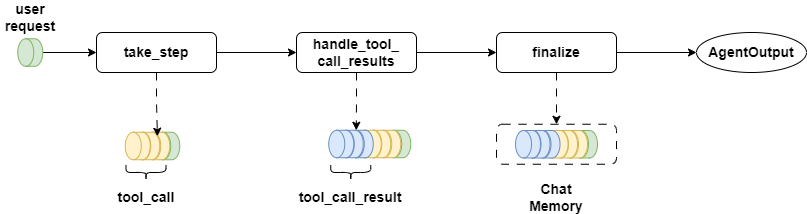
The take_step method receives the current chat history llm_input, and available tools for the agent. It uses astream_chat_with_tools and get_tool_calls_from_response to get the next tools to execute, storing tool call parameters in the Context.
Besides, take_step outputs the current round’s agent parameters and results in a stream, facilitating debugging and step-by-step viewing of intermediate agent execution results.
The handle_tool_call_results method doesn’t directly execute tools – tools are invoked concurrently in AgentWorkflow. It merely saves tool execution results in the Context.
The finalize method accepts an AgentOutput parameter but doesn’t alter it. Instead, it extracts tool call stacks from the Context, saving them as chat history in ChatMemory.
You can inherit and override FunctionAgent methods to implement your business logic, which I’ll demonstrate in the upcoming project practice.
Agentworkflow module
Having covered the Agent module, let’s delve into the AgentWorkflow module.
In previous projects, I implemented an orchestration process based on Workflow. This was the flowchart at that time:
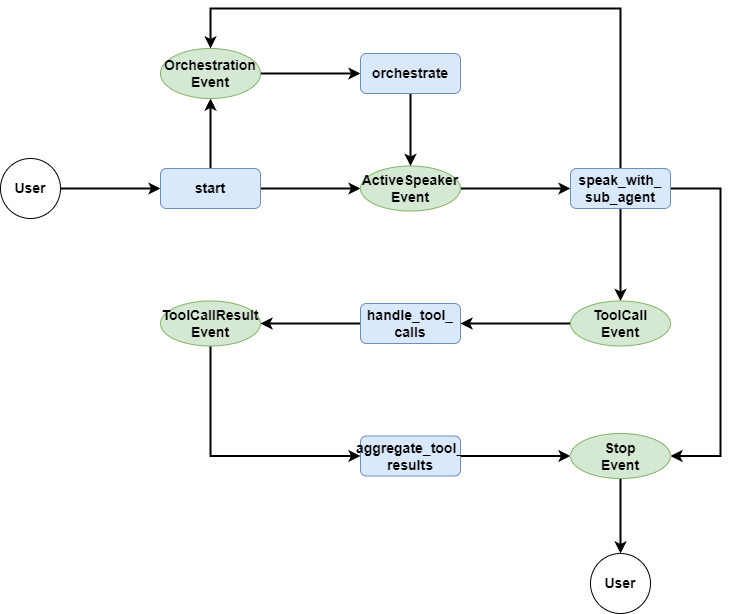
Since my code referenced LlamaIndex's official examples, AgentWorkflow closely resembles my implementation but is simplified as it extracts the handoff and function call logic. Here’s AgentWorkflow’s architecture:
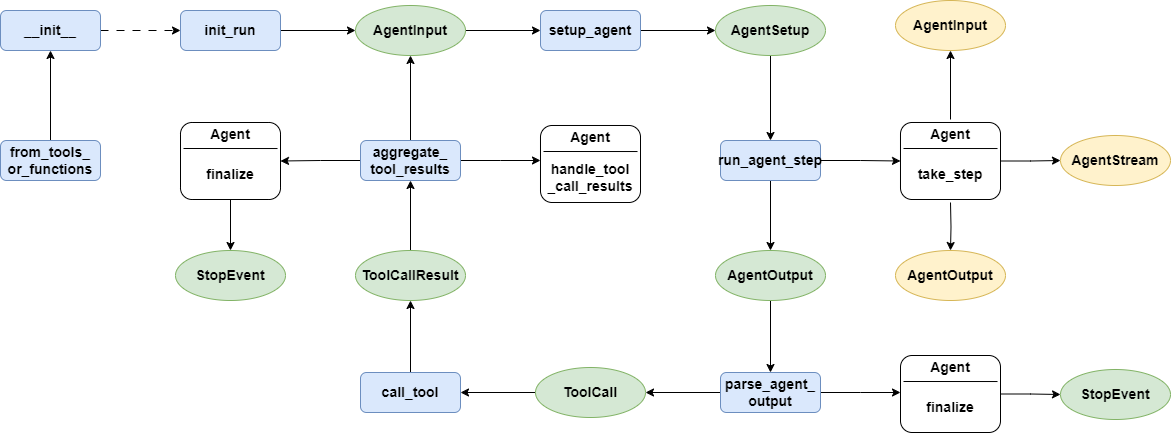
The entry point is the init_run method, which initializes Context and ChatMemory.
Next, setup_agent identifies the duty agent, extracting its system_prompt and merging it with the current ChatHistory.
Then, run_agent_step calls the agent’s take_step to obtain the required tools for invocation while writing large language model call results to the output stream. In the upcoming project practice, I’ll rewrite take_step for project-specific execution.
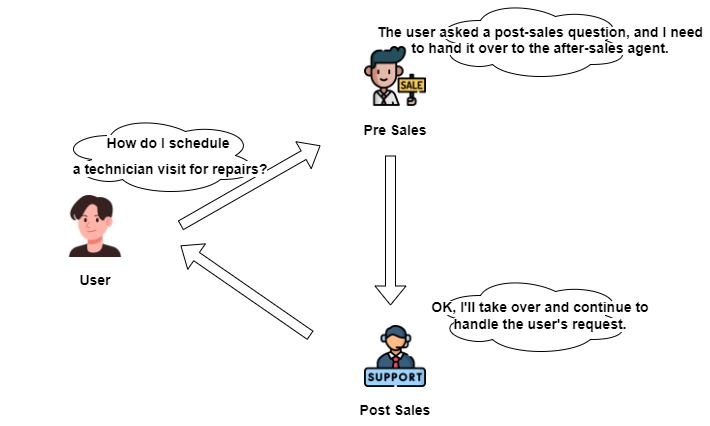
Notably, handoff, incorporated as a tool, integrates into agent-executable tools within run_agent_step. If the on-duty agent decides to transfer control to another agent, the handoff method defines next_agent in Context and uses DEFAULT_HANDOFF_OUTPUT_PROMPT to inform the succeeding agent to continue handling the user request.
parse_agent_output interprets executable tools; if none remain, the workflow returns the final result. Otherwise, it initiates concurrent execution.
call_tool finds and executes the specific tool’s code, writing results into ToolCallResult and throwing a copy into the output stream.
aggregate_tool_results consolidates tool call results, and checks if handoff was executed – if so, switch to the next on-duty agent, restarting the process. Otherwise, if no handoff or the tool's return_redirect is False, it restarts. Other scenarios end Workflow, while calling agent's handle_tool_call_results and finalize allows adjusting language model outcomes.
Apart from standard Workflow step methods, AgentWorkflow includes a from_tools_or_functions method for easy name comprehension. When using AgentWorkflow as an independent Agent, this initiates calling FunctionAgent or ReActAgent, executing them. Here’s an example:
from tavily import AsyncTavilyClient

async def search_web(query: str) -> str:
    """Useful for using the web to answer questions"""
    client = AsyncTavilyClient()
    return str(await client.search(query))

workflow = AgentWorkflow.from_tools_or_functions(
    [search_web],
    system_prompt="You are a helpful assistant that can search the web for information."
)
Useful Events in the Event Stream
You might have noticed that after adopting a multi-agent orchestration framework, one of the biggest hurdles we face is the long wait time for the workflow to complete all agent executions, and it's hard to know what's happening during the workflow execution.
The handoff mechanism of AgentWorkflow handles this much better: when an agent gains control, it continuously responds to user requests without having to re-execute the workflow each time. For visualizing the steps during workflow execution, AgentWorkflow solves this by throwing events in the stream output pipeline in real time.
Similar to LlamaIndex Workflow, after calling the workflow's run method, we can use the handler.stream_events() method to get all the events in the pipeline, and then use the isinstance method to filter the events:
handler = workflow.run(
    user_msg=message.content,
    ctx=context
)
stream_msg = cl.Message(content="")
async for event in handler.stream_events():
    if isinstance(event, AgentInput):
        print(f"========{event.current_agent_name}:=========>")
        print(event.input)
        print("=================<")
    if isinstance(event, AgentOutput) and event.response.content:
        print("<================>")
        print(f"{event.current_agent_name}: {event.response.content}")
        print("<================>")
    if isinstance(event, AgentStream):
        await stream_msg.stream_token(event.delta)
await stream_msg.send()
Specifically, in the order of calls, AgentWorkflow throws five events: AgentInput, AgentStream, AgentOutput, ToolCall, and ToolCallResult, as shown in the diagram below:
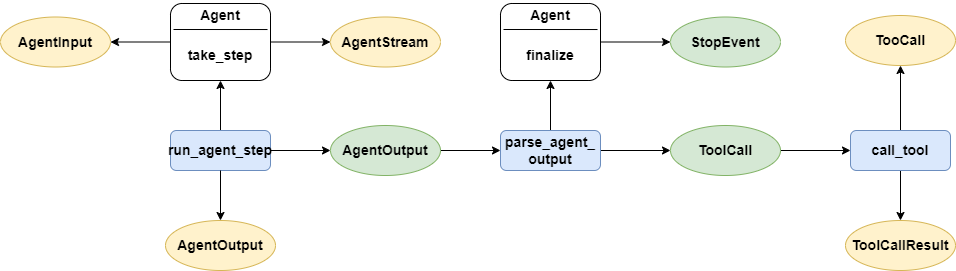
AgentInput is thrown in the take_step method of FunctionAgent, mainly containing the current chat history and agent name. Since the chat history is quite long, we only use this event for debugging and do not display it on the interface.
For me, AgentStream is the most useful event because it outputs the intermediate results of the current agent call as a message stream. If you want to understand what the large language model is thinking during workflow execution, you can focus on this event. But this event also outputs many intermediate results you might not need, depending on your choice.
AgentOutput is thrown by AgentWorkflow after the take_step method of FunctionAgent is completed. The main difference between this event and AgentStream is that it is a synchronous event. If you need to get all the messages of the current round at once, you can focus on this event.
ToolCall and ToolCallResult are used to contain the parameters of the tool call and the results from the tool call side, respectively. Like AgentInput, since the messages in these two events are quite long, we only use them for debugging rather than displaying them on the interface.
Having covered AgentWorkflow’s basics, we'll now move on to project practice. To offer a direct comparison, this project again uses the customer service example from previous articles, displaying how simple AgentWorkflow's development can be.
Customer Service Project Practice Based on Agentworkflow
In a previous article, I demonstrated using a customer service project to showcase LlamaIndex Workflow’s capability of multi-agent orchestration akin to OpenAI Swarm.
Today's project uses AgentWorkflow to present its development ease with the same customer service project for clear understanding.
Final effect
Here’s the final project display:
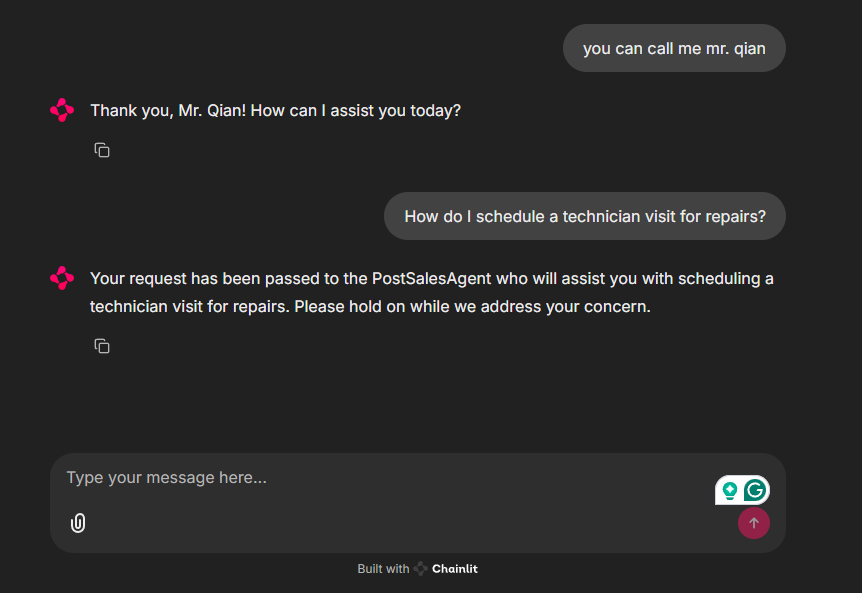
As shown, when a user makes a request, the system automatically hands it off to the corresponding agent based on intent.
Next are the core codes. Due to length, only important code is presented here; visit the code repository at the article's end for details.
Defining agents
In the multi-agent-customer-service project, I’ll create a new src_v2 folder and modify the sys.path in app.py to reuse the previously created data model.
In the previous project, the customer demand response logic was written into Workflow, making workflow.py unwieldy and tough to maintain. This time, ConciergeAgent, PreSalesAgent, and PostSalesAgent will truly handle customer services, using AgentWorkflow framework code without business logic addition.
Hence, a new agents.py file defines concierge_agent, pre_sales_agent, and post_sales_agent agent instances.
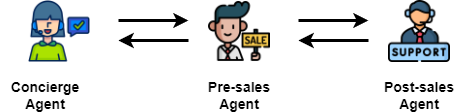
Each agent requires a name and description, crucial as AgentWorkflow organizes them by these as key-value pairs for handoff references, determining the next agent transition.
Starting with concierge_agent, it checks if the user has registered a name – if not, it executes the login tool for registration; otherwise, based on intent, it decides whether to transfer control to the other two agents.
concierge_agent = FunctionAgent(
    name="ConciergeAgent",
    description="An agent to register user information, used to check if the user has already registered their title.",
    system_prompt=(
        "You are an assistant responsible for recording user information."
        "You check from the state whether the user has provided their title or not."
        "If they haven't, you should ask the user to provide it."
        "You cannot make up the user's title."
        "If the user has already provided their information, you should use the login tool to record this information."
    ),
    tools=[login],
    can_handoff_to=["PreSalesAgent", "PostSalesAgent"]
)
Then comes pre_sales_agent, responsible for pre-sales inquiries. Upon receiving a request, it reviews chat history, queries VectorIndex according to inquiries, and responds strictly following documentation. If the user isn’t inquiring about pre-sales, it transfers control to the other two agents.
pre_sales_agent = FunctionAgent(
    name="PreSalesAgent",
    description="A pre-sales assistant helps answer customer questions about products and assists them in making purchasing decisions.",
    system_prompt=(
        "You are an assistant designed to answer users' questions about product information to help them make the right decision before purchasing."
        "You must use the query_sku_info tool to get the necessary information to answer the user and cannot make up information that doesn't exist."
        "If the user is not asking pre-purchase questions, you should transfer control to the ConciergeAgent or PostSalesAgent."
    ),
    tools=[query_sku_info],
    can_handoff_to=["ConciergeAgent", "PostSalesAgent"]
)
Lastly, post_sales_agent handles questions and after-sales policies regarding product usage. Like pre_sales_agent, it can only reply based on existing documents, minimizing large language model misconceptions.
post_sales_agent = FunctionAgent(
    name="PostSalesAgent",
    description="After-sales agent, used to answer user inquiries about product after-sales information, including product usage Q&A and after-sales policies.",
    system_prompt=(
        "You are an assistant responsible for answering users' questions about product after-sales information, including product usage Q&A and after-sales policies."
        "You must use the query_terms_info tool to get the necessary information to answer the user and cannot make up information that doesn't exist."
        "If the user is not asking after-sales or product usage-related questions, you should transfer control to the ConciergeAgent or PreSalesAgent."
    ),
    tools=[query_terms_info],
    can_handoff_to=["ConciergeAgent", "PreSalesAgent"]
)
Ui development with Chainlit
Since Workflow logic is no longer necessary, after developing all agents, UI development can commence directly, again using Chainlit.
In ready_my_workflow, initialize AgentWorkflow and Context while storing workflow and context instances in user_session in the start method:
def ready_my_workflow() -> tuple[AgentWorkflow, Context]:
    workflow = AgentWorkflow(
        agents=[concierge_agent, pre_sales_agent, post_sales_agent],
        root_agent=concierge_agent.name,
        initial_state={
            "username": None
        }
    )
    ctx = Context(workflow=workflow)
    return workflow, ctx


@cl.on_chat_start
async def start():
    workflow, ctx = ready_my_workflow()
    cl.user_session.set("workflow", workflow)
    cl.user_session.set("context", ctx)

    await cl.Message(
        author="assistant", content=GREETINGS
    ).send()
Next, in the main method, fetch user messages and call workflow for responses. Additional code is provided to demonstrate monitoring AgentInput and AgentOutput message streams; adjust as needed:
@cl.on_message
async def main(message: cl.Message):
    workflow: AgentWorkflow = cl.user_session.get("workflow")
    context: Context = cl.user_session.get("context")

    handler = workflow.run(
        user_msg=message.content,
        ctx=context
    )
    stream_msg = cl.Message(content="")
    async for event in handler.stream_events():
        if isinstance(event, AgentInput):
            print(f"========{event.current_agent_name}:=========>")
            print(event.input)
            print("=================<")
        if isinstance(event, AgentOutput) and event.response.content:
            print("<================>")
            print(f"{event.current_agent_name}: {event.response.content}")
            print("<================>")
        if isinstance(event, AgentStream):
            await stream_msg.stream_token(event.delta)
    await stream_msg.send()
With this, our project code is complete. AgentWorkflow encapsulates multi-agent orchestration logic well, making our v2 version more focused, where good agent writing suffices.
Next, we will try to integrate LlamaIndex and DeepSeek-R1 to enable AgentWorkflow to output reasoning content:
 Peng Qian
Improving FunctionAgent
Executing my project code, you might notice something odd:
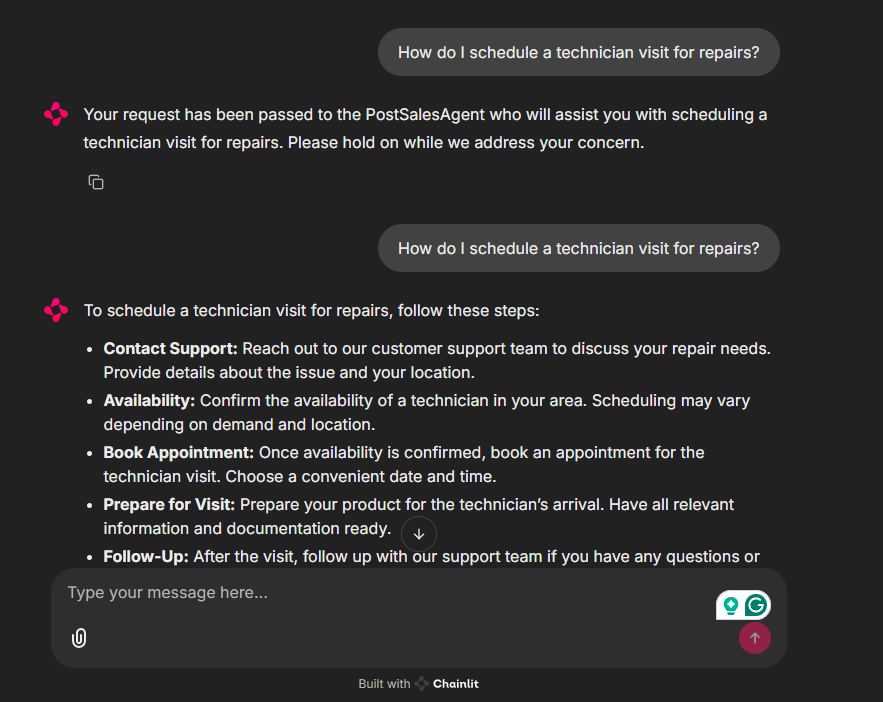
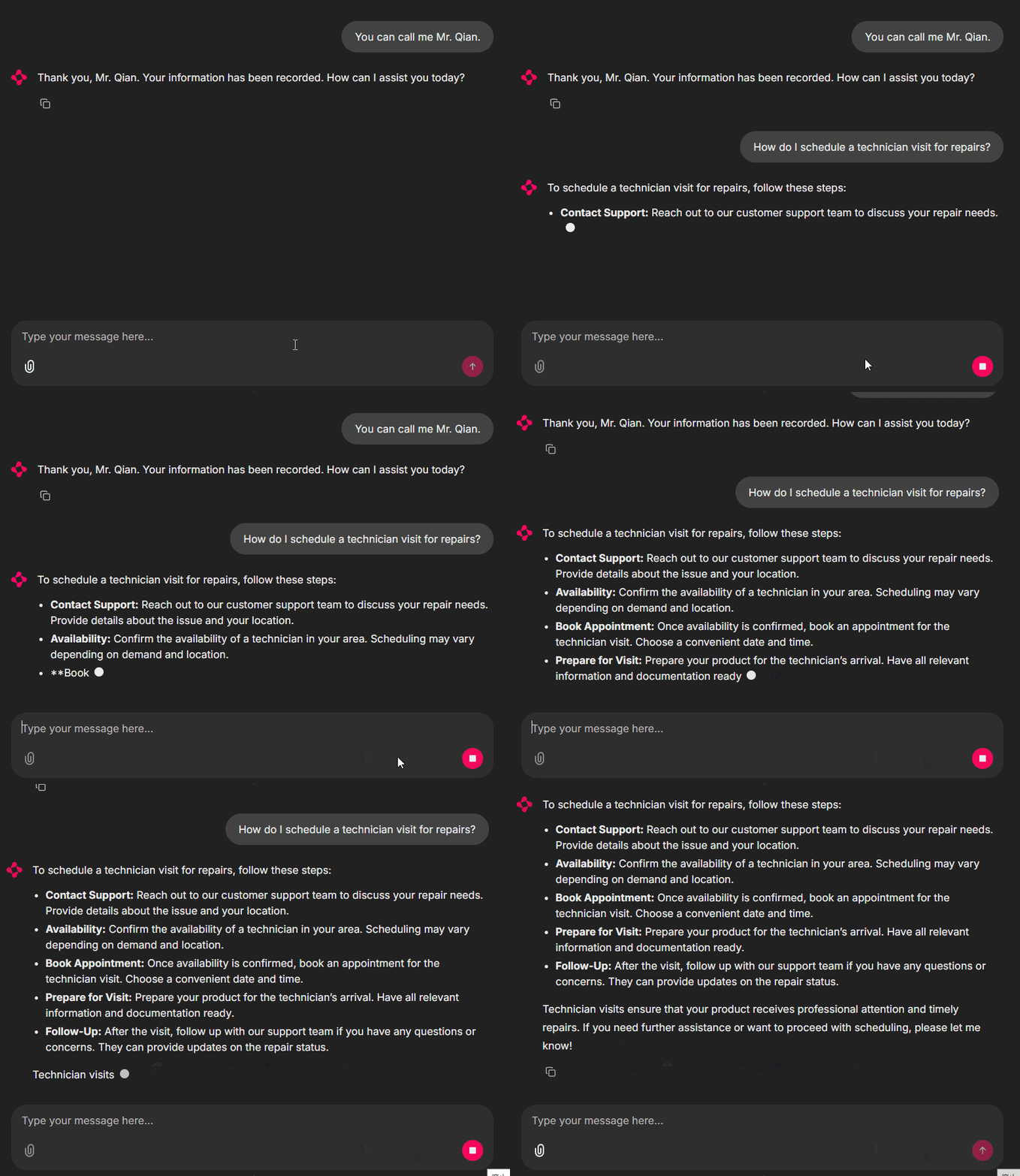
The system correctly identifies user intent and hands it to the next agent, but the latter doesn't immediately respond, requiring the user to repeat.
I've written a detailed article diving deep into the technical reasons behind this phenomenon and the ultimate solution. You can read it here:
 Peng Qian
After a series of debugs, I located the problem: the agent taking over cannot well trace back the chat history to find the user's request.
Thus, I attempted to extend FunctionAgent and modify some codes. After some tweaks, agents now respond promptly upon receiving the handoff, proving effective:
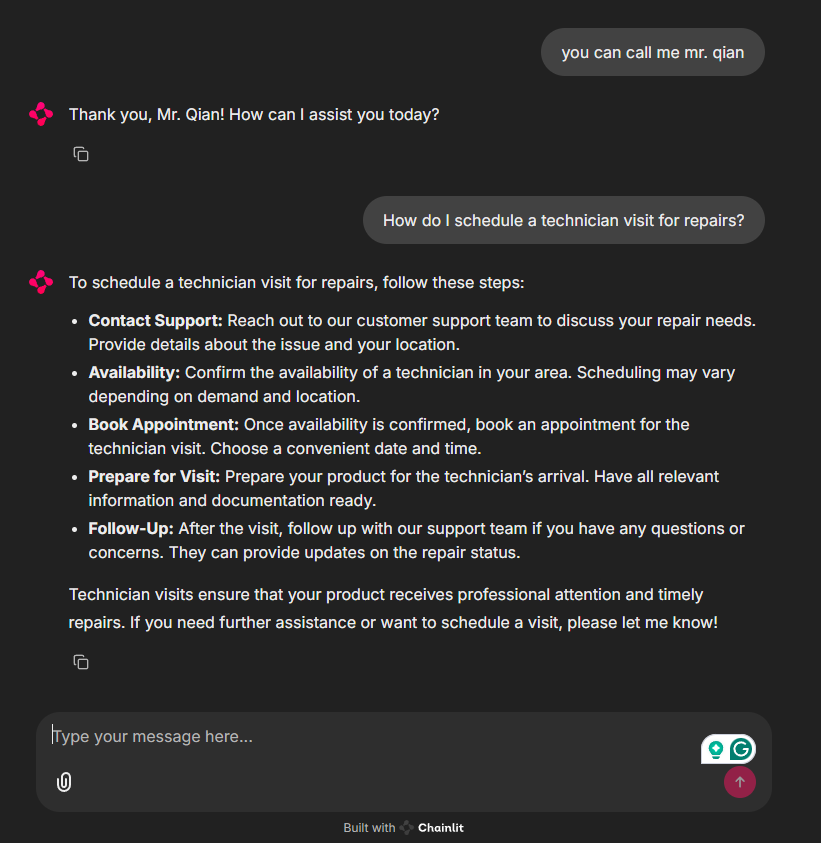
Let me explain the reason and how I handled it:
In the original implementation of FunctionAgent, each tool_call and its result are stored as separate messages in the ChatMemorycall from the handoff method.
For example, when the agent on duty realizes it needs to hand off the user's request to the next agent, a message related to the handoff method call is stored. Once the handoff is completed, another message indicating the completion is stored.
The user's request is already stored in the ChatMemory before these two handoff-related messages are added.
ChatMemory is a first-in, first-out queue, meaning the earliest messages are at the front. It also has a token limit, so messages exceeding this limit are removed from the queue. After the agent handoff, two situations can occur:
- The user's request message is still in the queue but pushed to the front by the two handoff messages, causing the large language model to overlook the user's request.
- Due to the token limit, the user's request message is removed from the queue, preventing the large language model from recalling the user's request from
ChatMemory.
In either case, the new agent can't perceive the user's previous request and waits for the user to resubmit it.
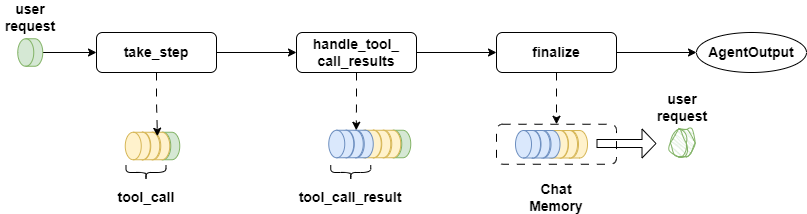
Understanding the issue, the solution was simple: relocate the user’s previous request to the chat history’s end after the agent transition.
The take_step in FunctionAgent is called when AgentWorkflow’s run_agent_step begins. Hence, inserting adjustment logic here is ideal:
class MyFunctionAgent(FunctionAgent):
    @override
    async def take_step(
            self,
            ctx: Context,
            llm_input: List[ChatMessage],
            tools: Sequence[AsyncBaseTool],
            memory: BaseMemory,
    ) -> AgentOutput:
        last_msg = llm_input[-1] and llm_input[-1].content
        state = await ctx.get("state", None)
        print(f">>>>>>>>>>>{state}")
        if "handoff_result" in last_msg:
            for message in llm_input[::-1]:
                if message.role == MessageRole.USER:
                    last_user_msg = message
                    llm_input.append(last_user_msg)
                    break

        return await super().take_step(ctx, llm_input, tools, memory)
As shown, I iterate chat_history in reverse until finding the most recent user-requested message, appending it to chat_history’s end.
Then I can replace my Agent from the FunctionAgent class with MyFunctionAgent, like this:
concierge_agent = MyFunctionAgent(
    name="ConciergeAgent",
    description="An agent to register user information, used to check if the user has already registered their title.",
    system_prompt=(
        "You are an assistant responsible for recording user information."
        "You check from the state whether the user has provided their title or not."
        "If they haven't, you should ask the user to provide it."
        "You cannot make up the user's title."
        "If the user has already provided their information, you should use the login tool to record this information."
    ),
    tools=[login],
    can_handoff_to=["PreSalesAgent", "PostSalesAgent"]
)
You can do the same thing with pre-sales-agent and post-sales-agent.
A potential challenge arises: how to apply this solely during agent transition, bypassing regular steps?
Earlier, we noted that AgentWorkflow returns handoff_output_prompt after handoff executes the handoff method. The succeeding agent's most recent message is this handoff_output_prompt.
Hence, during AgentWorkflow initialization, I pass in a custom handoff_output_prompt similar to the default but tagged upfront with "handoff_result":
def ready_my_workflow() -> tuple[AgentWorkflow, Context]:
    workflow = AgentWorkflow(
        agents=[concierge_agent, pre_sales_agent, post_sales_agent],
        root_agent=concierge_agent.name,
        handoff_output_prompt=(
            "handoff_result: Due to {reason}, the user's request has been passed to {to_agent}."
            "Please review the conversation history immediately and continue responding to the user's request."
        ),
        initial_state={
            "username": None
        }
    )
    ctx = Context(workflow=workflow)
    return workflow, ctx
Thus, in take_step, user message relocation only occurs when messages include the handoff_result tag, effectively resolving the issue.
Conclusion
In today's increasingly rich multi-agent orchestration scenarios, LlamaIndex has timely adjusted its positioning and launched the AgentWorkflow framework last month, greatly simplifying the development of agent orchestration based on LlamaIndex Workflow.
In today’s article, I thoroughly explained AgentWorkflow’s principles and illustrated through the customer service project practice how development has simplified compared to only using Workflow.
Though I believe AgentWorkflow brings LlamaIndex’s multi-agent solution close to perfection, the framework's recent release means specific scenarios still need refinement. I look forward to further practices to enhance it. Keep pushing forward, LlamaIndex!
Thanks for reading. You’re welcome to comment on your perspective regarding LlamaIndex AgentWorkflow, and I’ll respond as soon as possible.
Mr. Qian's Recommendation:
Designing an event-driven LlamaIndex Workflow is one of the biggest steps you can take. From here, you should think about how to use LlamaIndex to build a production-ready, high-accuracy RAG system.
We recommend checking out the RAG for Generative AI Applications specialization course brought to you by industry experts at IBM.
You'll get hands-on experience with all the key tools and skills you need to build a RAG Workflow, so you can hit the ground running from day one.
If you choose to enroll, I may earn a small commission at zero extra cost to you. I only recommend high-quality resources that genuinely align with the engineering standards of Data Leads Future.
Here are the associated source codes from this article for free reading or modification:
 qtalen