
Build Long-Term and Short-Term Memory for Agents Using RedisVL
Pros and cons analysis based on real-world practice


Introduction
For this weekend note, I want to share some tries I made using RedisVL to add short-term and long-term memory to my agent system.
TLDR: RedisVL works pretty well for short-term memory. It feels a bit simpler than using the traditional Redis API. For long-term memory with semantic search, the experience is not good. I do not recommend it.
Why RedisVL?
Big companies like to use mature infrastructure to build new features.
We know mem0 and Graphiti are good open source software for long-term agent memory. But companies want to stay safe. Building new infrastructure costs money. It is unstable. It needs people who know how to run it.
So when Redis launched RedisVL with vector search, we naturally wanted to try it first. You can connect it to existing Redis clusters and start using it. That sounds nice. But is it really nice? We need to try it for real.
Today I will cover how to use MessageHistory and SemanticMessageHistory from RedisVL to add short-term and long-term memory to agents built on the Microsoft Agent Framework.
You can find the source code at the end of this article.
Don’t forget to follow my blog to stay updated on my latest progress in AI application practices.
Preparation
Install Redis
If you want to try it locally, you can install a Redis instance with Docker.
docker run -d --name redis -p 6379:6379 -p 8001:8001 redis/redis-stack:latestCannot use Docker Desktop? See my other article.
 Peng Qian
The Redis instance will listen on ports 6379 and 8001. Your RedisVL client should connect to redis://localhost:6379. You can visit http://localhost:8001 in the browser to open the Redis console.
Install RedisVL
Install RedisVL with pip.
pip install redisvlAfter installation, you can use the RedisVL CLI to manage your indexes and keep your testing neat.
rvl index listallImplement Short-Term Memory Using MessageHistory
There are lots of “How to” RedisVL articles online, so let’s start straight from Microsoft Agent Framework and see how to use MessageHistory for short-term memory.
As in the official tutorial, you should implement a RedisVLMessageStore based on ChatMessageStoreProtocol.
class RedisVLMessageStore(ChatMessageStoreProtocol):
    def __init__(
        self,
        thread_id: str = "common_thread",
        top_k: int = 6,
        session_tag: str | None = None,
        redis_url: str | None = "redis://localhost:6379",
    ):
        self._thread_id = thread_id
        self._top_k = top_k
        self._session_tag = session_tag or f"session_{uuid4()}"
        self._redis_url = redis_url
        self._init_message_history()
In __init__ you should note two parameters.
thread_idis used for thenameparameter when creatingMessageHistory. I like to bind it to the agent. Each agent gets a uniquethread_id.session_taglets you set a tag for each user so different sessions do not mix.
The protocol asks us to implement two methods list_messages and add_messages.
list_messagesruns before the agent calls the LLM. It gets all available chat messages from the message store. It takes no parameters, so it cannot support long-term memory. More on that later.add_messagesruns after the agent gets the LLM’s reply. It stores new messages into the message store.
Here is how the message store works.
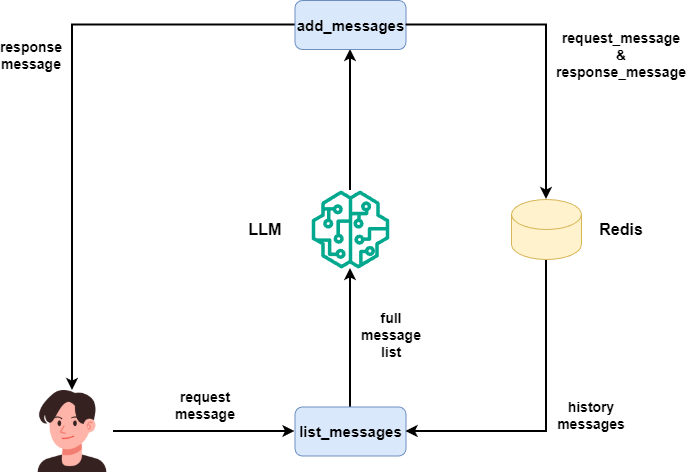
So in list_messages and add_messages we just use RedisVL’s MessageHistory to do the job.
list_messages below uses get_recent to get top_k recent messages and turns them into ChatMessage.
class RedisVLMessageStore(ChatMessageStoreProtocol):
    ...

    async def list_messages(self) -> list[ChatMessage]:
        messages: list[dict[str, str]] = self._message_history.get_recent(
            top_k=self._top_k,
            session_tag=self._session_tag,
        )
        return [self._back_to_chat_message(message)
                for message in messages]
add_messages turns the ChatMessage into Redis messages and calls add_messages to store them.
class RedisVLMessageStore(ChatMessageStoreProtocol):
    ...

    async def add_messages(self, messages: Sequence[ChatMessage]):
        messages = [self._to_redis_message(message)
                    for message in messages]
        self._message_history.add_messages(
            messages,
            session_tag=self._session_tag
        )
That is short-term memory done with RedisVL. You may also implement deserialize, serialize and update_from_state for saving and loading the memory, but it is not important now. See the full code at the end.
Test RedisVLMessageStore
Let’s build an agent and test the message store.
agent = OpenAILikeChatClient(
    model_id=Qwen3.NEXT
).create_agent(
    name="assistant",
    instructions="You're a little helper who answers my questions in one sentence.",
    chat_message_store_factory=lambda: RedisVLMessageStore(
        session_tag="user_abc"
    )
)
Now a console loop for multi-turn dialog. Remember, Microsoft Agent Framework does not support short-term memory unless you use an AgentThread and pass it to run.
async def main():
    thread = agent.get_new_thread()
    while True:
        user_input = input("User: ")
        if user_input.startswith("exit"):
            break
        response = await agent.run(user_input, thread=thread)
        print(f"\nAssistant: {response.text}")
    thread.message_store.clear()
AgentThread when created calls the factory method to build the RedisVLMessageStore.
To check if the store works, we can use mlflow.openai.autolog() to see if messages sent to the LLM contain historical messages.
import mlflow
mlflow.set_tracking_uri(os.environ.get("MLFLOW_TRACKING_URI"))
mlflow.set_experiment("Default")
mlflow.openai.autolog()
See my other article for using MLFlow to track LLM calls.
 Peng Qian
Let’s open the Redis console to see the cache.
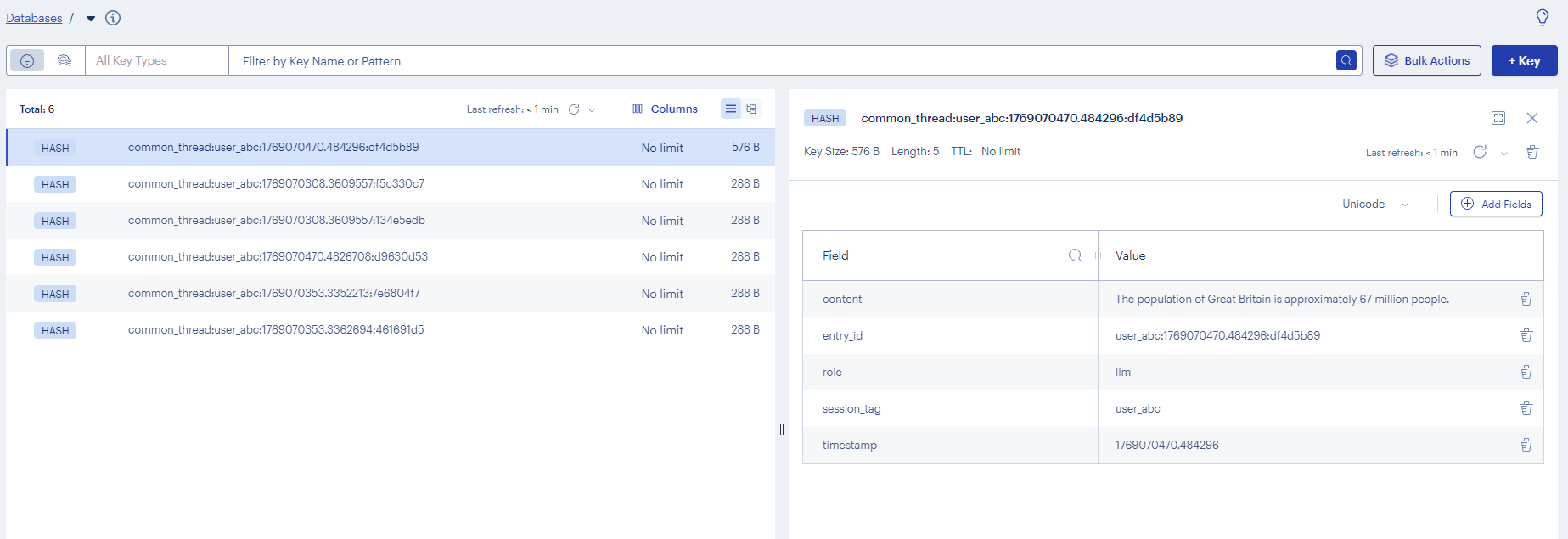
As you can see, after using MessageHistory as MAF's message store, we can implement multi-turn conversations with historical messages.
With thread_id and session_tag parameters, we can also implement the feature that lets users switch between multiple conversation sessions, like in popular LLM chat applications.
Feels simpler than the official RedisMessageStore solution right?
Implement Long-Term Memory Using SemanticMessageHistory
SemanticMessageHistory is a subclass of MessageHistory. It adds a get_relevant method for vector search.
Example:
prompt = "what have I learned about the size of England?"
semantic_history.set_distance_threshold(0.35)
context = semantic_history.get_relevant(prompt)
for message in context:
    print(message)
Batches: 100%|██████████| 1/1 [00:00<00:00, 56.30it/s]
{'role': 'user', 'content': 'what is the size of England compared to Portugal?'}Compared to MessageHistory the big thing here is that we can get the most relevant historical messages based on the user request.
You might think that if MessageStore short-term memory is nice, then SemanticMessageHistory with semantic search must be even better.
From my experience, this is not the case.
From my test results, it is not like that. Let’s now make a long-term memory adapter for Microsoft Agent Framework using SemanticMessageHistory and see the result.
In my latest research, I’m going to bring in an LLM to handle memory retrieval so long‑term memory can become more interconnected:
 Peng Qian
Use SemanticMessageHistory in Microsoft Agent Framework
Earlier I said list_messages in ChatMessageStoreProtocol has no parameters, so we cannot search history. Thus, we cannot use MessageStore for long-term memory.
Microsoft Agent Framework has a ContextProvider class. From its name, it is for context engineering.
So we should build long-term memory on this class.
class RedisVLSemanticMemory(ContextProvider):
    def __init__(
        self,
        thread_id: str | None = None,
        session_tag: str | None = None,
        distance_threshold: float = 0.3,
        redis_url: str = "redis://localhost:6379",
        embedding_model: str = "BAAI/bge-m3",
        embedding_api_key: str | None = None,
        embedding_endpoint: str | None = None,
    ):
        self._thread_id = thread_id or "semantic_thread"
        self._session_tag = session_tag or f"session_{uuid4()}"
        self._distance_threshold = distance_threshold
        self._redis_url = redis_url
        self._embedding_model = embedding_model
        self._embedding_api_key = embedding_api_key or os.getenv("EMBEDDING_API_KEY")
        self._embedding_endpoint = embedding_endpoint or os.getenv("EMBEDDING_ENDPOINT")
        self._init_semantic_store()
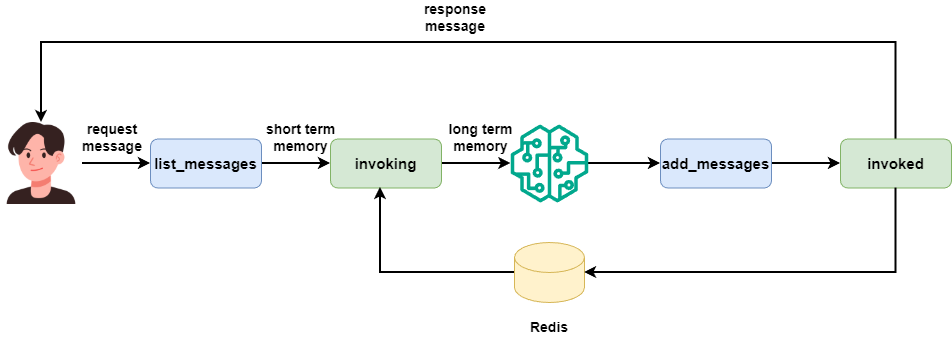
ContextProvider has two methods invoked and invoking.
invokedruns after LLM call. It stores the latest messages in RedisVL. It has bothrequest_messageandresponse_messagesparameters but stores them separately.invokingruns before LLM call. It uses the user’s current input to search for relevant history in RedisVL and returns aContextobject.
The Context object has three variables.
instructionsstring. The agent adds this to the system prompt.messageslist. Put history messages found in long-term memory here.toolslist for functions. The agent adds these tools to itsChatOptions.

Since we want to use vector search to get relevant history, we put those messages in messages. The order between MessageStore messages and ContextProvider messages matters. Here is the order of their calls.
Setting up a TextVectorizer
Semantic vector search needs embeddings. We must set up a vectorizer.
💡 Unlock Full Access for Free!
Subscribe now to read this article and get instant access to all exclusive member content + join our data science community discussions.