
Advanced RedisVL Long-term Memory Tutorial: Using an LLM to Extract Memories
Building an intelligent, context-aware memory system


Introduction
In this weekend note, we keep talking about how to build long-term memory for an agent with RedisVL.
When we build a long-term memory module for an agent, we need to care about two points most:
- After long running, will the saved memories grow too large and cause context explosion?
- How do we recall the memories that matter most to the current context?
We will solve these two problems today.
TLDR: In this hands-on tutorial, we first use an LLM to extract information from user messages that has value for later chats. Then we store that as long-term memory in RedisVL. When needed, we search related memories with semantic search. With this setup, the agent understands the past context of the user and gives more accurate answers.
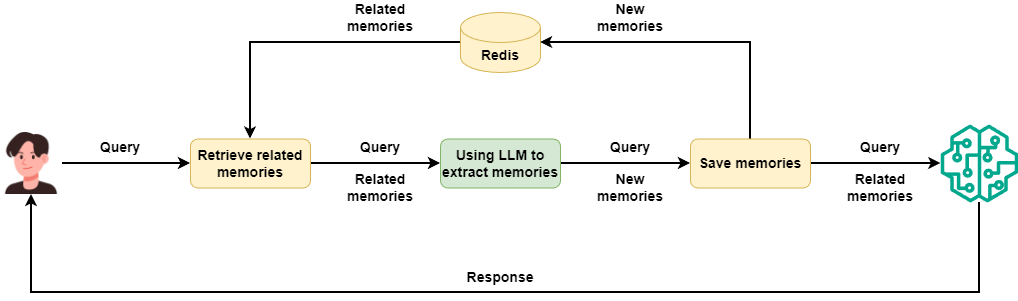
With this kind of long-term memory, we do not worry about memory explosion after long running. We also do not worry that unrelated memories will hurt LLM responses.
You can get all the source code at the end of this post.
Why do we do this?
In the last hands-on post, I shared how to build short-term and long-term memory for an agent with RedisVL:
 Peng Qian
The short-term part works very well. RedisVL API feels much simpler than the raw Redis API. I can write that code with little effort.
The long-term part does not work. We follow the official example and store user queries and LLM responses in RedisVL. When chat continues, RedisVL keeps pulling repeated queries or unrelated answers via semantic search. This troubles the LLM a lot and blocks the chat from going on.
Can we avoid RedisVL?
Your boss will not agree. There is already Redis in your stack. Why do you still want to install mem0 or other open source tools? How about extra cost? This is real life.
So we still need to make RedisVL work. But I do not want to run around like a headless fly. Before that I want to see how humans handle memory.
Don’t forget to follow my blog to stay updated on my latest progress in AI application practices.
How Humans Handle Memory
What deserves memory
First, we need to know one thing. Only information that centers on me and links to me tightly deserves a sticky note.
So what information about me do I want to write down?
- Preference settings such as tools I like, languages I use, my schedule, and my tone when I talk
- Stable personal info such as my role, my time zone, and my daily habits
- Goals and decisions, such as chosen options, plans, and sentences that start with “I decide to...”
- Key milestones such as job change, moving, deadlines, and product launches
- Work and project context, such as project names, stakeholders, needs, and status like “done/next” step.
- Repeated pain points or strong views that will change LLM advice later
- Things I say with “remember this ...” or “do not forget ...”
What does not deserve memory
I do not plan to store any LLM answer. LLM answers to the same question will change with context. So LLM answers in long-term memory do not help much.
Besides LLM answers, I also do not want to keep these:
- One-time small things that likely will not matter later
- Very sensitive personal data such as health diagnosis, exact address, government IDs, passwords, bank accounts
- Things I clearly ask not to remember
- Things I already wrote down on the sticky note
Design a Prompt for LLM Memory Extraction
Now we know how humans handle memory. Next, I want to build an agent that follows the same rules and extracts memories from my daily chats.
The key lives in the system prompt. I need to describe all rules in the system prompt. Then I ask the agent to follow these rules with very high consistency.
In the past, I might have tried some “write 1000-line prompt” challenge. Now I do not need that. I just open any LLM client, paste these rules, then ask the LLM to help me write a system prompt. This takes less than one minute.
After a few tries, I pick one I like. Here is that system prompt:
Your job:
Based only on the user’s current input and the existing related memories, decide whether you need to add a new “long-term memory,” and if needed, **extract just one fact**. You do not talk to the user. You only handle memory extraction and deduplication.

---

### 1. Core principles

1. Only save information that **will likely be useful in the future**.
2. **At most one fact per turn**, and it must clearly appear in the current input.
3. **Never invent or infer anything**. You can only restate or lightly rephrase what the user has explicitly said.
4. If the current input has nothing worth keeping, or the information is already in the related memories, then do not add a new memory.

---

### 2. What counts as “long-term memory”

Only consider the categories below, and decide whether the information has long-term value:

...
Due to space, I only show part of the prompt here. You can get the full prompt from the source code at the end.
Build a ContextProvider for Long-term Memory
After we finish the memory extraction rules, we start to build the long-term memory module for the agent.
For future use, I still pick Microsoft Agent Framework MAF. It gives a ContextProvider feature that lets us plug long-term memory into the agent in a simple way.
Of course the principle of long-term memory stays the same. You can use any agent framework you like and build your own memory module. Or you can ignore frameworks and first build storage and retrieval of memories, and then call them through function calls. That is fine.
Run memory extraction in sequence
In the last post, I already built a long-term memory module with ContextProvider. The new version looks similar. But this time, we use an LLM to extract memories. So after we set up ContextProvider, we first use the system prompt to build a memory extraction agent.
If you do not know how to use ContextProvider yet, I suggest you read my last post again. That post explains ChatMessageStore and ContextProvider in Microsoft Agent Framework in detail:
 Peng Qian
To avoid too much unrelated data from Redis, I set the distance_threshold value pretty small. But not too small. If too small, then it loses meaning. You can pick the value you like.
class LongTermMemory(ContextProvider):
    def __init__(
        self,
        thread_id: str | None = None,
        session_tag: str | None = None,
        distance_threshold: float = 0.3,
        context_prompt: str = ContextProvider.DEFAULT_CONTEXT_PROMPT,
        redis_url: str = "redis://localhost:6379",
        embedding_model: str = "BAAI/bge-m3",
        llm_model: str = Qwen3.NEXT,
        llm_api_key: str | None = None,
        llm_base_url: str | None = None,
    ):
        ...
        self._init_extractor()

    def _init_extractor(self):
        with open("prompt.md", "r", encoding="utf-8") as f:
                system_prompt = f.read()

        self._extractor = OpenAILikeChatClient(
            model_id=self._llm_model,
        ).as_agent(
            name="extractor",
            instructions=system_prompt,
            default_options={
                "response_format": ExtractResult,
                "extra_body": {"enable_thinking": False}
            },
        )
Next we implement the invoking method. This method runs before the user agent calls the LLM. In this method, we extract and store long-term memory
To make the logic clear, I first implement the invoking method in order, as in this diagram:
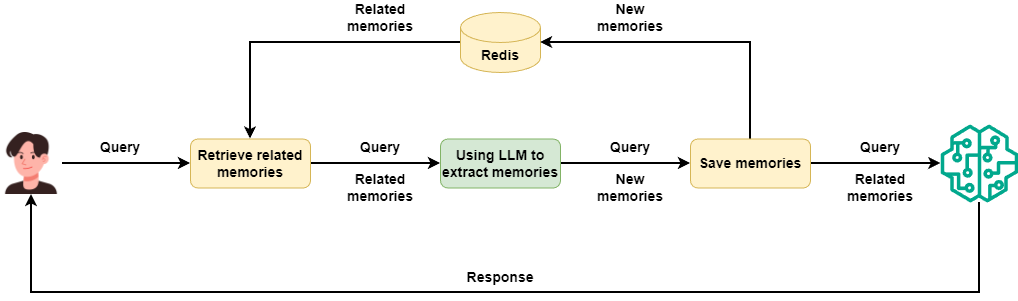
When a new user request comes into ContextProvider, we first search RedisVL with semantic search for the most similar memories.
class LongTermMemory(ContextProvider):
    ...

    async def invoking(
        self,
        messages: ChatMessage | MutableSequence[ChatMessage],
        **kwargs: Any
    ) -> Context:
        if isinstance(messages, ChatMessage):
            messages = [messages]
        prompt = "\n".join([m.text for m in messages])

        line_sep_memories = self._get_line_sep_memories(prompt)
        ...

    def _get_line_sep_memories(self, prompt: str) -> str:
        context = self._semantic_store.get_relevant(prompt, role="user", session_tag=self._session_tag)
        line_sep_memories = "\n".join([f"* {str(m.get("content", ""))}" for m in context])

        return line_sep_memories
Next, we send these existing memories plus the user request to the memory extraction agent. That agent first checks if anything is worth saving according to the rules. Then it extracts a new helpful memory from the user request and saves it into RedisVL.
class LongTermMemory(ContextProvider):
    ...

    async def invoking(
        self,
        messages: ChatMessage | MutableSequence[ChatMessage],
        **kwargs: Any
    ) -> Context:
        ...
        await self._save_memory(messages, line_sep_memories)
        ...

    async def _save_memory(
        self,
        messages: ChatMessage | MutableSequence[ChatMessage],
        relevant_memory: str | None = None,
    ) -> None:
        detect_messages = (
            [
            ChatMessage(role=Role.USER, text=f"Existing related memories:\n\n{relevant_memory}"),
            ] + list(messages)
            if relevant_memory.strip()
            else list(messages)
        )
        response = await self._extractor.run(detect_messages)

        extract_result: ExtractResult = cast(ExtractResult, response.value)
        if extract_result.should_write_memory:
            self._semantic_store.add_messages(
                messages=[
                    {"role": "user", "content": extract_result.memory_to_write}
                ],
                session_tag=self._session_tag,
            )
Last, we put the memories from RedisVL into Context as extra context. These memory messages get merged into the history of the real chat agent. They give the chat agent extra background to produce answers.
class LongTermMemory(ContextProvider):
    ...

    async def invoking(
        self,
        messages: ChatMessage | MutableSequence[ChatMessage],
        **kwargs: Any
    ) -> Context:
        ...

        return Context(messages=[
            ChatMessage(role="user", text=f"{self._context_prompt}\n{line_sep_memories}")
        ] if len(line_sep_memories)>0 else None)
Now we build a simple chat agent to test the new long-term memory module
agent = OpenAILikeChatClient(
    model_id=Qwen3.MAX
).as_agent(
    name="assistant",
    instructions="You are a helpful assistant.",
    context_provider=LongTermMemory(),
)

async def main():
    thread = agent.get_new_thread()

    while True:
        user_input = input("\nUser: ")
        if user_input.startswith("exit"):
            break
        stream = agent.run_stream(user_input, thread=thread)
        print("Assistant: \n")
        async for event in stream:
            print(event.text, end="", flush=True)
        print("\n")


if __name__ == "__main__":
    asyncio.run(main())
Now we chat with the agent and see how it works:
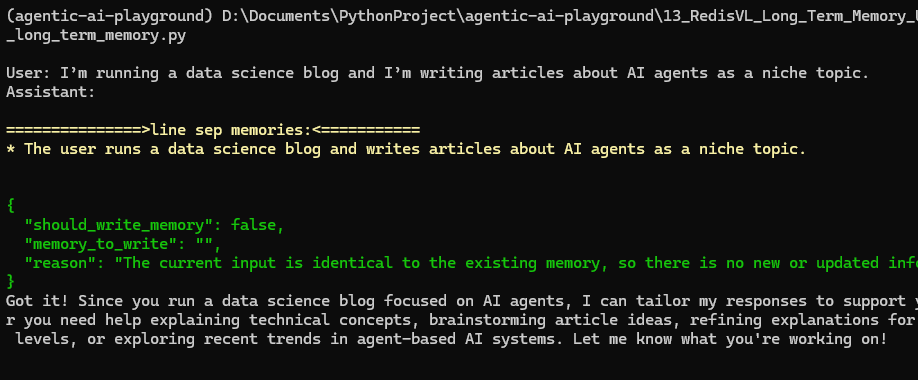
From MLFlow we see that the retrieved memories go in as a separate message in the chat history:
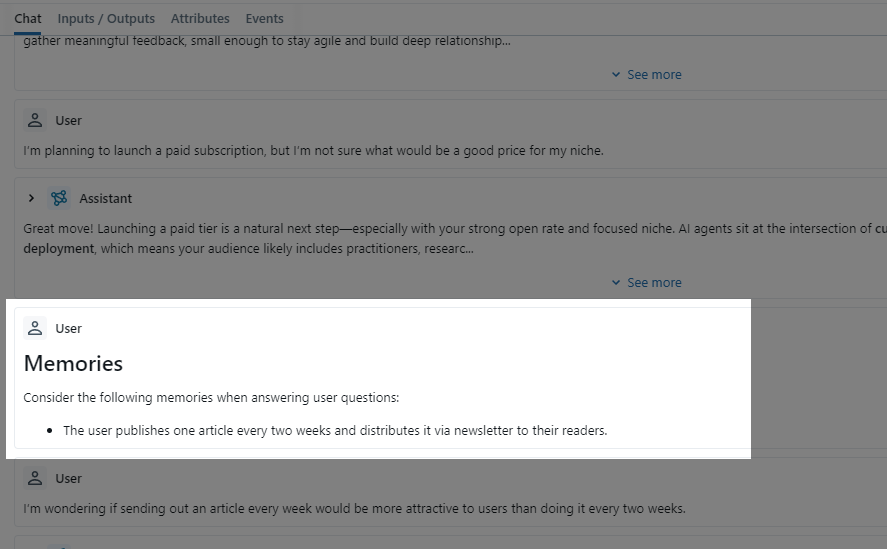
Then we check Redis and see what memories we saved:
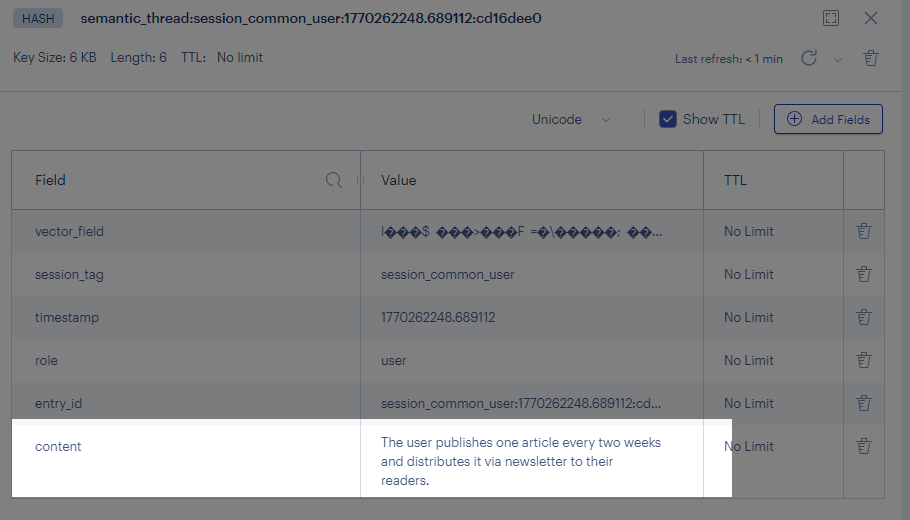
We can see that as the chat goes on, the new long-term memory module no longer stores and retrieves all chat history without filter. It keeps and retrieves only memories that matter to the user, and these memories give strong help in later chats.
Use concurrency to speed up
Everything looks fine except for the part where we use an LLM to extract memories that deserve saving.
The largest delay in an agent often comes from LLM calls. Now we add one more LLM call. We also need to wait for the LLM to decide whether to save memory before we go on with the real chat.
We can add some logs and see how much delay we add:
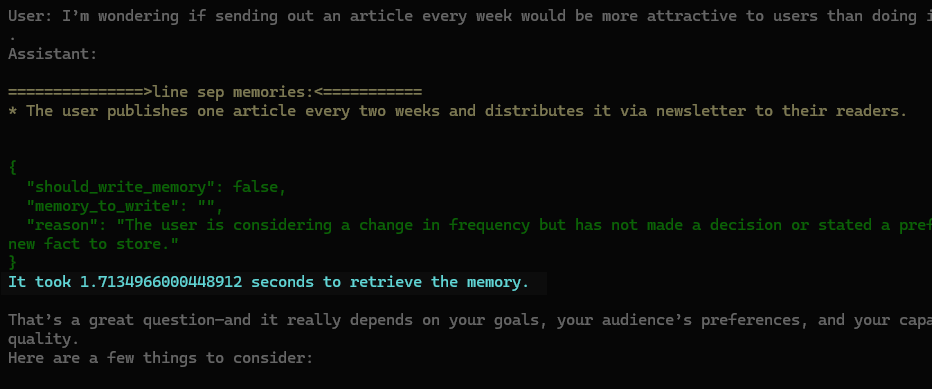
We add more than one second per chat turn.
One way to optimize is to use a smaller model like qwen3-8b. But the gain stays small. We save little time and hurt memory quality due to the smaller model.
Today I use a different way. I use concurrent programming so that the LLM call for memory extraction and the LLM call for user reply run at the same time.
Let us see the result after that change:
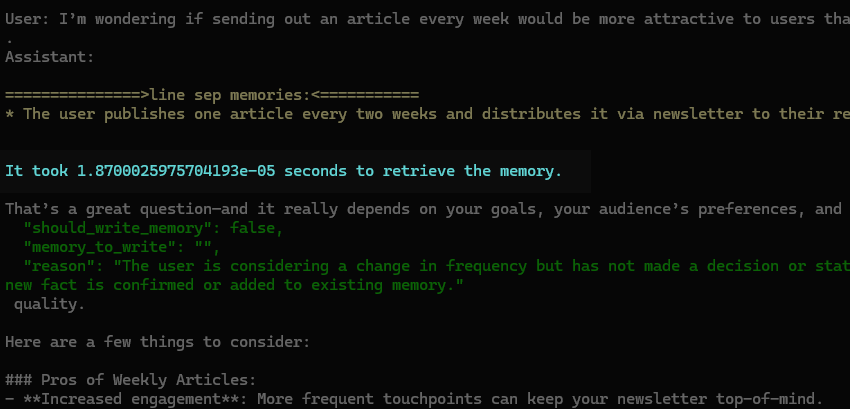
The time cost for extraction and storage of memory becomes almost nothing while the effect stays the same. How do we reach that?
💡 Unlock Full Access for Free!
Subscribe now to read this article and get instant access to all exclusive member content + join our data science community discussions.