> ## Content Index
> Fetch the complete content index at: https://www.dataleadsfuture.com/llms.txt
> Use this file to discover other available public pages before exploring further.
# Make Microsoft Agent Framework’s Structured Output Work With Qwen and DeepSeek Models
- URL: https://www.dataleadsfuture.com/make-microsoft-agent-frameworks-structured-output-work-with-qwen-and-deepseek-models/
- Published: 2025-12-11T12:05:57.000Z
- Updated: 2026-04-22T08:20:29.000Z
- Description: Updated to the latest version of Microsoft Agent Framework
- Author: Peng Qian
- Tags: Agentic AI, Generative AI, Microsoft Agent Framework
**Update:** After version `python-1.0.0b260114`, MAF made big changes to the `response_format` related APIs, but the official docs haven’t been updated yet. This article is based on version `python-1.0.0b260127` and brings you the latest structured output solution.
## Introduction
Today, we’ll add some extra features to the Microsoft Agent Framework so that Qwen and DeepSeek can also utilize structured output.
The main reason is that Autogen has stayed on version v0.75 for a long time, which makes it necessary to switch to Microsoft Agent Framework soon.
Every time we switch the agent framework, we have to make it work with some common LLMs. This time is no exception. Luckily, Microsoft Agent Framework is pretty easy to use. We just need to adapt the structured output feature, and we can use it right away.
As usual, I’ll put the source code at the end of the article for you to use.
---
## Background On Structured Output
### How does Agent Framework do structured output?
In Microsoft Agent Framework, we set the `response_format` parameter to a Pydantic `BaseModel` data class to tell the LLM to produce structured output, like this:
```python
from pydantic import BaseModel
class PersonInfo(BaseModel):
"""Information about a person."""
name: str | None = None
age: int | None = None
occupation: str | None = None
response = await agent.run(
"Please provide information about John Smith, who is a 35-year-old software engineer.",
options={
"response_format": PersonInfo
},
)
```
There are two places to set the `response_format` parameter:
1. Set it during the `ChatAgent` initialization in `default_options` parameter. This becomes a global parameter for the agent, and all later communications with OpenAI-compatible models use it.
2. Set it when calling `run` or `run_stream` in `options` parameter. This works only for that single API call.
The `response_format` set in `run` or `run_stream` is higher priority than the setting in the `ChatAgent` creation. That means the `response_format` in `run` will override what was set when creating the `ChatAgent`.
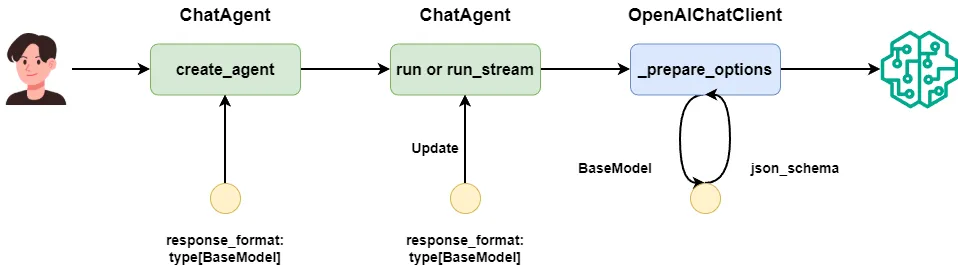
The conversion process of the response\_format parameter in Microsoft Agent Framework. Image by Author
By default, we use `OpenAIChatClient` to call OpenAI’s API. Before the API call, a `_prepare_options` method converts the `BaseModel` into `{"type": "json_schema", "json_schema": }` and passes it to the LLM.
So that’s how Agent Framework makes the LLM do structured output. Our extension will go into the `_prepare_options` method of `OpenAIChatClient`.
### Do Qwen and DeepSeek support json\_schema settings?
According to the official docs, both Qwen and DeepSeek support structured output. But they only support setting the OpenAI client’s `response_format` to `{"type": "json_object"}` and require the keyword `json` in the prompt to enable structured output. They do not support OpenAI’s API way of setting `response_format` to `json_schema`.
If we don’t extend the Microsoft Agent Framework and force `response_format` to be a `BaseModel` class, we’ll see errors like this:
```text
Error code: 400 - {'error': {'message': "<400> InternalError.Algo.InvalidParameter: 'messages' must contain the word 'json' in some form, to use 'response_format' of type 'json_object'.", 'type': 'invalid_request_error', 'param': None, 'code': 'invalid_parameter_error'}}
```
So for Qwen and DeepSeek, without modifying the Microsoft Agent Framework, we can’t use the structured output feature.
### How to make Qwen and DeepSeek output using json\_schema
Even though Qwen and DeepSeek don’t support `{"type": "json_schema"}`, we can still inject `json_schema` into the system prompt so the LLM outputs according to our data class.
The trick is: before calling the OpenAI API, convert the `BaseModel` to its `json_schema`, attach it to the system prompt, and send it along.
If you want to know exactly how I made Qwen output according to a Pydantic BaseModel’s rules, read my popular article where I explain multiple methods for this:
[Build AutoGen Agents with Qwen3: Structured Output & Thinking ModeSave yourself 40 hours of trial and errorData Leads FuturePeng Qian](https://www.dataleadsfuture.com/build-autogen-agents-with-qwen3-structured-output-thinking-mode/)
---
## How I Extended It
Now, let’s see exactly how to extend Microsoft Agent Framework so Qwen and DeepSeek can do structured output.
I know you want the answer fast, so here’s the modified code you can use right now:
```python
from typing import override, MutableSequence, Any
from textwrap import dedent
from copy import deepcopy
from pydantic import BaseModel
from agent_framework.openai import OpenAIChatClient
from agent_framework import ChatMessage, ChatOptions, TextContent
class OpenAILikeChatClient(OpenAIChatClient):
@override
def _prepare_options(self, messages: MutableSequence[ChatMessage], options: dict[str, Any]) -> dict[str, Any]:
chat_options_copy = deepcopy(options)
response_format = chat_options_copy.get("response_format")
if (
response_format
and isinstance(response_format, type)
and issubclass(response_format, BaseModel)
):
structured_output_prompt = self._build_structured_prompt(response_format)
if old_instructions := chat_options_copy.get("instructions"):
chat_options_copy["instructions"] = f"{old_instructions}\n\n{structured_output_prompt}"
else:
messages = [ChatMessage(role=Role.SYSTEM, text=structured_output_prompt), *messages]
chat_options_copy["response_format"] = {"type": "json_object"}
return super()._prepare_options(messages, chat_options_copy)
@staticmethod
def _build_structured_prompt(response_format: type[BaseModel]) -> str:
json_schema = response_format.model_json_schema()
structured_output_prompt = dedent(f"""
\n
Your output must adhere to the following JSON schema format,
without any Markdown syntax, and without any preface or explanation:\n
{json_schema}\n
""")
return structured_output_prompt
```
As I said before, both `run` and `run_stream` call `OpenAIChatClient`’s `_prepare_options` method, so it’s the best place to extend.
I marked each part of the code with numbers in the comments so I can explain in order:
1. The `chat_options` object is the parameters you pass to the method. We need to `deepcopy` it to a new object because we’re going to change `response_format` to `{"type": "json_object"}` to work with DeepSeek. Agent Framework still needs the original `BaseModel` to convert the returned JSON string back to a data class.
2. Then we take the `json_schema` from the `BaseModel`, turn it into part of the system prompt, and wrap it with `xml` tags.
3. The original `_prepare_options` checks if `messages` is empty. We’ll only handle the case where `messages` is not empty, meaning the user sends at least a user message.
4. If the first message in `messages` is a system message, we attach the structured output prompt to the system message, replacing the old system message.
5. If the first message is a user message, we create a new system message with just the structured output prompt and put it at the front of the `messages` list.
With this change, Microsoft Agent Framework now supports structured output for Qwen and DeepSeek. Next, let’s test some common cases to make sure it works.
---
## Testing the Extension
### Prepare an MLflow server to observe
Before testing, we need a monitoring tool to check the messages Agent Framework sends to the LLM API.
Agent Framework supports logging platforms based on `opentelemetry`, but it doesn’t log system messages by default, so that won’t work for our case today.
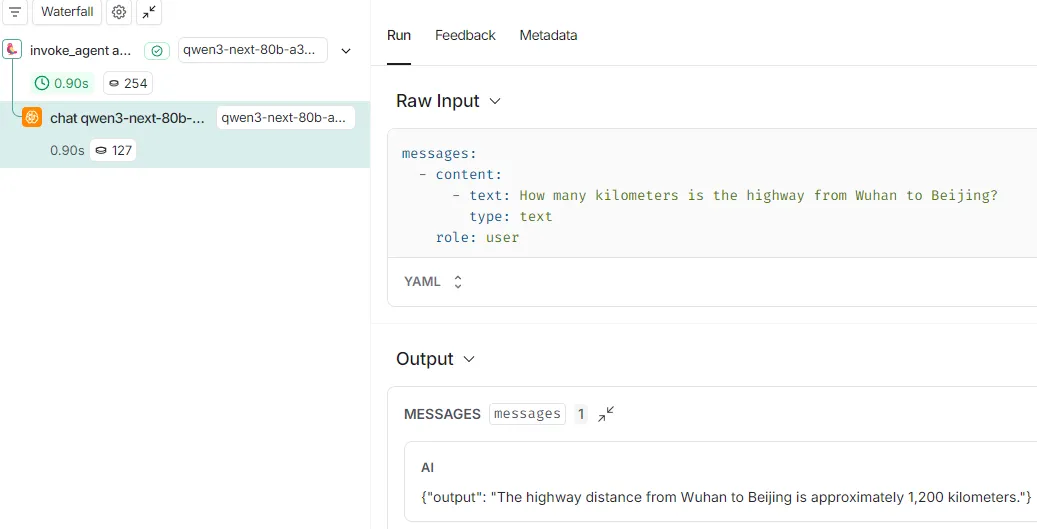
Agent Framework's OpenTelemetry output doesn't log the system message used when calling the LLM. Image by Author
In a previous article, I showed how I use MLflow to see the messages sent to OpenAI’s API:
[Monitoring Qwen 3 Agents with MLflow 3.x: End-to-End Tracing TutorialEnhance your multi-agent application’s observability, explainability and TraceabilityData Leads FuturePeng Qian](https://www.dataleadsfuture.com/monitoring-qwen-3-agents-with-mlflow-3-x-end-to-end-tracking-tutorial/)
So today we’ll still use MLflow’s `openai.autolog` API, because it can record system messages sent to the LLM.
You just need to start a `server` like this:
```shell
mlflow server --host 0.0.0.0 --port 5000
```
Then in the test code, add a call to `openai.autolog`:
```python
mlflow.set_tracking_uri(os.environ.get("MLFLOW_TRACKING_URI"))
mlflow.set_experiment("Default")
mlflow.openai.autolog()
```
### Test single-turn conversation
First, let’s follow the official docs to test normal structured output.
Set up a data class, then set it in the `run` method:
```python
class PersonInfo(BaseModel):
"""Information about a person."""
name: str | None = None
age: int | None = None
occupation: str | None = None
async def main():
response = await agent.run(
"Please provide information about John Smith, who is a 35-year-old software engineer.",
options={
"response_format": PersonInfo
},
)
print(response.text)
```
Check on MLflow:
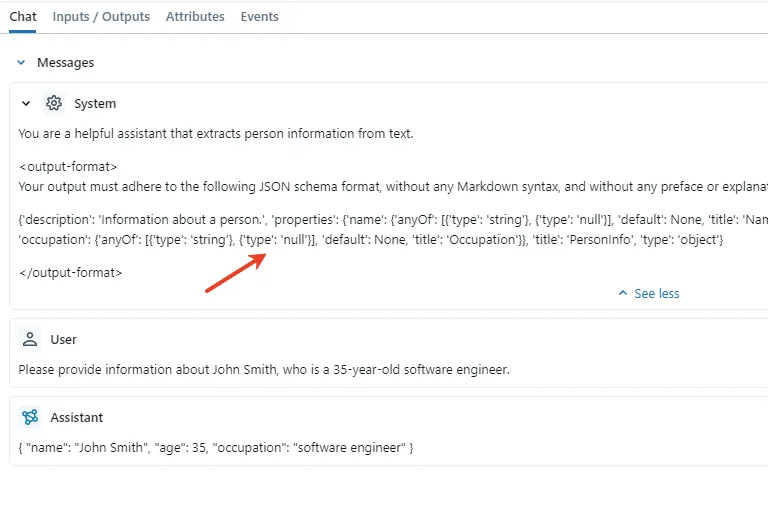
The json\_schema prompt has already been appended to the system prompt. Image by Author
We can see the data class has been turned into a `json_schema` prompt, attached to the system prompt. Also, we can get the structured object directly through `response.value`.
### Test multi-turn conversation
Now let’s test Microsoft Agent Framework’s multi-turn example.
First, set a `response_format` at `create_agent`, without setting it in `run`:
```python
class OutText(BaseModel):
output: str
agent = client.create_agent(
instructions="You are a good assistant.",
name="assistant",
default_options={
"response_format": OutText
},
)
async def main():
result1 = await agent.run(
"How many kilometers is the highway from Wuhan to Beijing?",
thread=thread,
)
print(result1.text)
```
Then use `run_stream` for the second turn and set another `response_format`:
```python
class ETA(BaseModel):
hours: int
final_response = await AgentRunResponse.from_agent_response_generator(
agent.run_stream(
"How long would it take to drive there at 120 km/h?",
thread=thread,
options={
"response_format": ETA
},
),
output_format_type=ETA
)
print(final_response.value)
```
Check on MLflow:
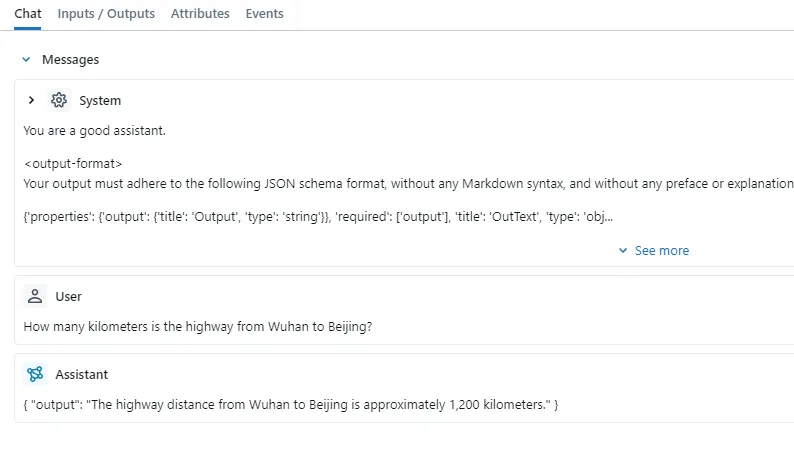
The first round of conversation used the default response\_format parameter. Image by Author
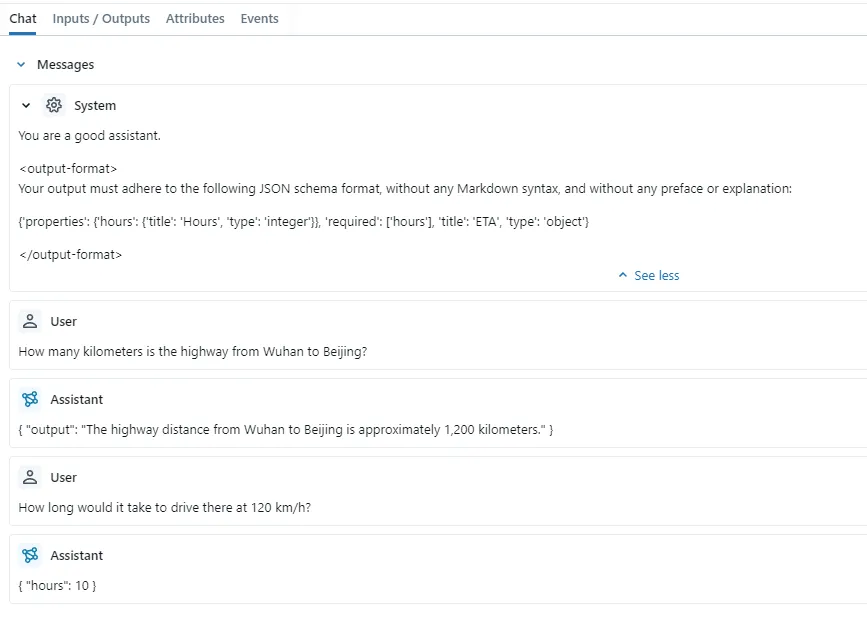
The second round of conversation switched to the response\_format parameter passed into the run\_stream method. Image by Author
No problems at all. The `response_format` in `run_stream` overrides the one set in `create_agent` as expected.
---
## Conclusion
With Autogen no longer updated, we’ve started moving to Microsoft Agent Framework.
During this migration, we extended the Microsoft Agent Framework so Qwen and DeepSeek can use structured output.
I hope Qwen and DeepSeek’s APIs will one day support setting `response_format` to `{"type": "json_schema"}` directly, so we wouldn’t have to adapt the framework every time we switch.
Structured output is just about adding a `json_schema` description in the system prompt so the LLM outputs content as we define. So even if you’re not using Microsoft Agent Framework, you can modify things in a similar way.
That’s it for today’s journey. If you find this tutorial useful, please share it with your friends.
---
Here’s the source code for today’s tutorial:
[agentic-ai-playground/10\_Agent\_Framework\_Qwen3\_DeepSeek at main · qtalen/agentic-ai-playgroundContribute to qtalen/agentic-ai-playground development by creating an account on GitHub.GitHubqtalen](https://github.com/qtalen/agentic-ai-playground/tree/main/10%5FAgent%5FFramework%5FQwen3%5FDeepSeek)
## Follow Data Leads Future
One practical story every month, sharing my hard-learned experiences in the enterprise AI space.
Subscribe
Email sent! Check your inbox to complete your signup.
You can unsubscribe anytime.